
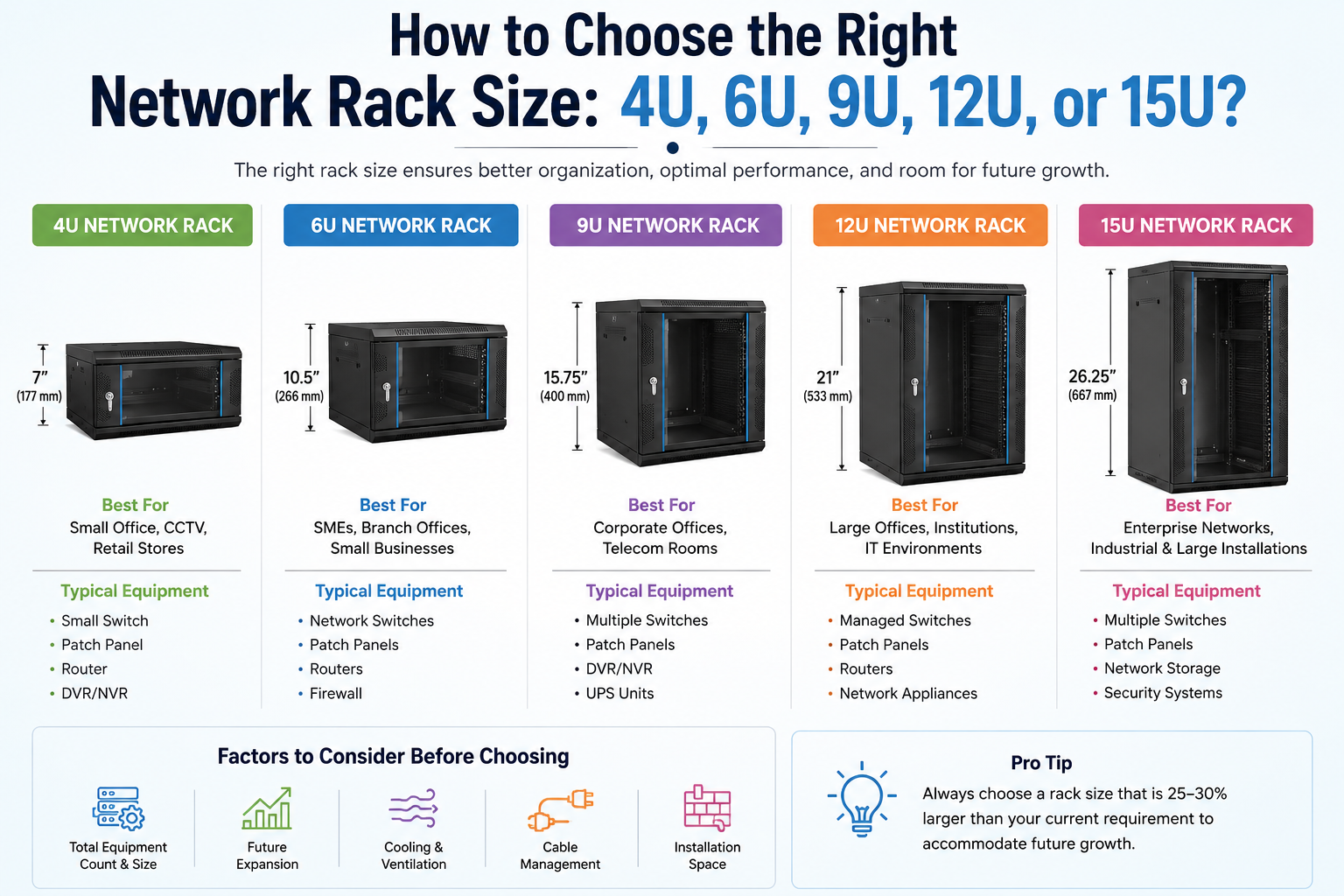
Learn how to choose the right network size for your business. Compare 4U, 6U, 9U, 12U, and 15U wall mount racks, their applications, benefits, and sizing requirements.
In today’s connected business environment, a well-organized network infrastructure is essential for ensuring performance, security, and scalability. Whether you’re setting up a small office network, CCTV system, telecom room, or server environment, choosing the right network rack size is a critical decision.
One of the most common questions IT managers, system integrators, and business owners ask is:
“Which rack size should You choose – 4U, 6U, 9U, 12U, or 15U?”
This guide will help you understand sizing and select the ideal wall mount network rack for your specific requirements.
What Does “U” Mean in a Network Rack?
The term “U” (Rack Unit) is a standard measurement used to define the height of rack-mounted equipment.
- 1U = 1.75 inches (44.45 mm)
- 2U = 3.5 inches
- 4U = 7 inches
- 6U = 10.5 inches
- 9U = 15.75 inches
- 12U = 21 inches
- 15U = 26.25 inches
The higher the U value, the more equipment it can accommodate.
Why Choosing the Correct Rack Size Matters
Selecting the right size helps you:
- Maximize space utilization
- Improve cable management
- Enhance airflow and cooling
- Simplify maintenance
- Reduce infrastructure costs
- Allow future expansion
Choosing a rack that is too small can limit growth, while an oversized rack may increase costs unnecessarily.
4U Network Rack: Best for Compact Installations
A 4U wall mount rack is ideal for small networking setups where space is limited.
Typical Equipment:
- Small network switch
- Patch panel
- Router
- CCTV recorder
Best Applications:
- Small offices
- Retail stores
- Clinics
- Security monitoring systems
Advantages:
- Compact footprint
- Cost-effective
- Easy installation
- Ideal for limited spaces
6U Network Rack: Ideal for Growing Networks
A 6U network provides additional space for organizations expecting moderate expansion.
Typical Equipment:
- Network switches
- Patch panels
- Routers
- Firewalls
Best Applications:
- SMEs
- Branch offices
- Educational institutions
- Healthcare facilities
Advantages:
- Better cable organization
- Additional room for upgrades
- Improved airflow
9U Network Rack: Balanced Capacity and Flexibility
A 9U is one of the most versatile choices for medium-sized network environments.
Typical Equipment:
- Multiple switches
- Patch panels
- DVR/NVR systems
- UPS units
Best Applications:
- Corporate offices
- Telecom rooms
- Manufacturing facilities
- Surveillance networks
Advantages:
- Excellent scalability
- Organized infrastructure
- Supports multiple devices
12U Network Rack: Suitable for Enterprise Deployments
A 12U wall mount is designed for larger networking environments requiring higher equipment density.
Typical Equipment:
- Managed switches
- Patch panels
- Routers
- Security appliances
- Network monitoring devices
Best Applications:
- Data communication rooms
- Educational campuses
- Banking institutions
- Government facilities
Advantages:
- Higher equipment capacity
- Better network organization
- Future-ready infrastructure
15U Network Rack: Maximum Capacity for Wall Mount Solutions
A 15U network provides substantial space while maintaining a wall-mounted design.
Typical Equipment:
- Multiple switches
- Patch panels
- Network storage devices
- Communication equipment
- Security systems
Best Applications:
- Enterprise IT environments
- Telecom installations
- Industrial facilities
- Large-scale surveillance projects
Advantages:
- Significant expansion capability
- Centralized network management
- Enhanced cable routing options
How to Calculate the Rack Size You Need
Before selecting:
Step 1: List All Equipment
Identify all devices that will be mounted inside it.
Step 2: Add Equipment Heights
Calculate the total units required.
Step 3: Reserve Space for Growth
Add at least 25–30% extra capacity for future expansion.
Step 4: Consider Accessories
Account for:
- Patch panels
- Cable managers
- Fan trays
- PDUs
- Shelves
Common Mistakes When Choosing a Network Rack
Buying Based Only on Current Requirements
Always plan for future network expansion.
Ignoring Cable Management
Poor cable organization can reduce efficiency and complicate maintenance.
Overlooking Cooling Requirements
Proper ventilation is essential for equipment reliability.
Selecting the Wrong Depth
Ensure the depth matches your equipment dimensions.
Which Rack Size Should You Choose?
| Requirement | Recommended Rack Size |
|---|---|
| Small CCTV or Office Network | 4U |
| Small Business Network | 6U |
| Medium Enterprise Network | 9U |
| High-Density Network Setup | 12U |
| Large IT Infrastructure | 15U |
Final Thoughts on Rack
Choosing the right network size is essential for building a reliable, scalable, and organized IT infrastructure. Whether you need a compact 4U for a small office or a spacious 15U for an enterprise deployment, selecting the correct size today can save time, cost, and effort in the future.
By evaluating your current equipment, planning for growth, and considering cooling and cable management requirements, you can ensure your networking infrastructure remains efficient and future-ready.